Developer API
A REST API for server-side image compression — for automation, backends, and pipelines. This is a separate product from the free browser tool above: requests here are processed on our servers (in memory, never persisted to disk), gated by an API key tied to your plan. Get a key from the dashboard.
Select language
Installation
No installation needed — call the REST endpoint directly with any HTTP client.
<dependency>
  <groupId>com.webpninja</groupId>
  <artifactId>webpninja-sdk</artifactId>
  <version>1.0.0</version>
</dependency>

// or Gradle (works the same in an Android app module):
implementation 'com.webpninja:webpninja-sdk:1.0.0'
pip install webpninja
npm install @webpninja/sdk
🚧 Publishing soon — not yet live on npm.
gem install webpninja
🚧 Publishing soon — not yet live on RubyGems.
composer require webpninja/webpninja
🚧 Publishing soon — not yet live on Packagist.
dotnet add package WebPNinja
🚧 Publishing soon — not yet live on NuGet.
Authentication
Pass your API key as a bearer token on every request:
Authorization: Bearer webpninja_live_<your_key>
WebPNinja client = new WebPNinja("webpninja_live_your_key");
// or: WebPNinja client = new WebPNinja(); // reads WEBPNINJA_API_KEY
client = WebPNinja("webpninja_live_your_key")
# or: client = WebPNinja() # reads WEBPNINJA_API_KEYconst client = new WebPNinja("webpninja_live_your_key");
// or: const client = new WebPNinja(); // reads WEBPNINJA_API_KEYrequest["Authorization"] = "Bearer webpninja_live_your_key"
"Authorization: Bearer webpninja_live_your_key"
client.DefaultRequestHeaders.Authorization =
new AuthenticationHeaderValue("Bearer", "webpninja_live_your_key"); 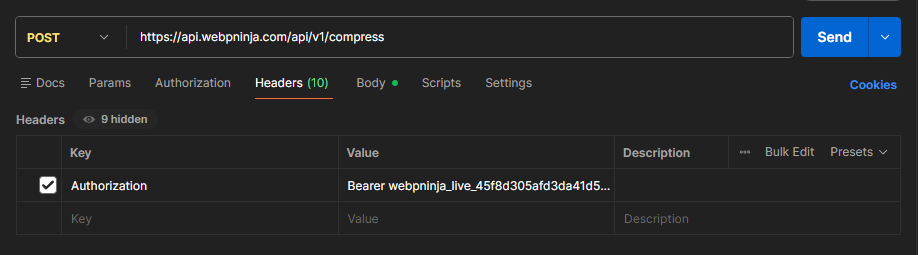
Compress an image
POST /api/v1/compress
— multipart form upload. Returns the compressed image bytes with the matching
Content-Type.
| Field | Description |
|---|---|
| file | The image to compress (multipart file field). Any format sharp can decode. |
| format | Output format: webp, jpeg, png, or avif. |
| quality | 10–100, default 80. Same compression settings as the browser tool at the same quality. |
curl -X POST https://api.webpninja.com/api/v1/compress \
  -H "Authorization: Bearer webpninja_live_your_key" \
  -F "file=@photo.png" \
  -F "format=webp" \
  -F "quality=75" \
  --output photo.webp
import com.webpninja.sdk.WebPNinja;

WebPNinja client = new WebPNinja("webpninja_live_your_key");

client.compressToFile(new File("photo.png"), new File("photo.webp"), "webp", 75);
from webpninja import WebPNinja
client = WebPNinja("webpninja_live_your_key")
client.compress_to_file("photo.png", "photo.webp", format="webp", quality=75) This is the real Node.js SDK code — it'll work as soon as the package is published (see Installation above).
import { WebPNinja } from "@webpninja/sdk";

const client = new WebPNinja("webpninja_live_your_key");

await client.compressToFile("photo.png", "photo.webp", {
  format: "webp",
  quality: 75,
});
Official Ruby SDK — coming soon. Here's how to call the API directly today:
require "net/http"
require "uri"

uri = URI("https://api.webpninja.com/api/v1/compress")
request = Net::HTTP::Post.new(uri)
request["Authorization"] = "Bearer webpninja_live_your_key"
request.set_form(
  [
    ["file", File.open("photo.png"), { filename: "photo.png" }],
    ["format", "webp"],
    ["quality", "75"],
  ],
  "multipart/form-data"
)

response = Net::HTTP.start(uri.hostname, uri.port, use_ssl: true) do |http|
  http.request(request)
end

raise response.body unless response.is_a?(Net::HTTPSuccess)

File.binwrite("photo.webp", response.body)
Official PHP SDK — coming soon. Here's how to call the API directly today:
<?php
$ch = curl_init("https://api.webpninja.com/api/v1/compress");

curl_setopt_array($ch, [
    CURLOPT_POST => true,
    CURLOPT_RETURNTRANSFER => true,
    CURLOPT_HTTPHEADER => ["Authorization: Bearer webpninja_live_your_key"],
    CURLOPT_POSTFIELDS => [
        "file" => new CURLFile("photo.png"),
        "format" => "webp",
        "quality" => "75",
    ],
]);

$result = curl_exec($ch);
$status = curl_getinfo($ch, CURLINFO_HTTP_CODE);
curl_close($ch);

if ($status !== 200) {
    throw new Exception($result);
}

file_put_contents("photo.webp", $result);
Official .NET SDK — coming soon. Here's how to call the API directly today:
using var client = new HttpClient();
client.DefaultRequestHeaders.Authorization =
    new AuthenticationHeaderValue("Bearer", "webpninja_live_your_key");

using var content = new MultipartFormDataContent();
content.Add(new ByteArrayContent(await File.ReadAllBytesAsync("photo.png")), "file", "photo.png");
content.Add(new StringContent("webp"), "format");
content.Add(new StringContent("75"), "quality");

var response = await client.PostAsync("https://api.webpninja.com/api/v1/compress", content);
response.EnsureSuccessStatusCode();

await File.WriteAllBytesAsync("photo.webp", await response.Content.ReadAsByteArrayAsync()); 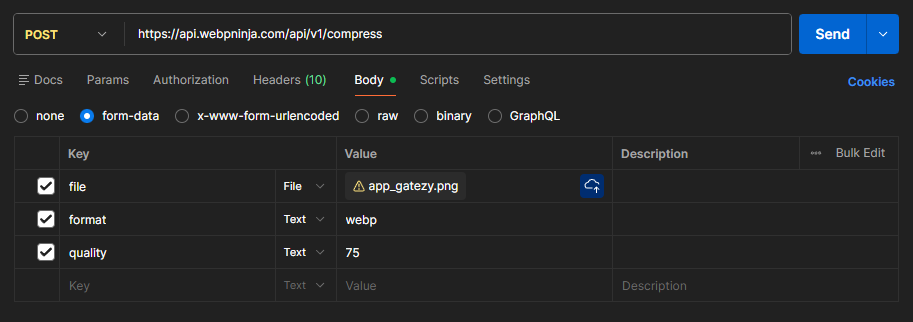
Quotas & rate limits
Free includes 15 compressions per day, resetting at
midnight UTC, at up to 15 requests/min. Starter and
Pro have no compression quota — unlimited compressions,
at up to 60 and 120 requests/min respectively. Exceeding a quota or rate limit returns
429 Too Many Requests.
See your current plan and usage on the dashboard.
Upload size limits
Each plan also caps the size of a single image: Free — 15 MB,
Starter — 33 MB, Pro — 200 MB.
A file over your plan's limit returns 413 Payload Too Large.
Errors
| Status | Meaning |
|---|---|
| 400 | Missing file, or an invalid format/quality value. |
| 401 | Missing, invalid, or revoked API key. |
| 422 | The file couldn't be decoded or compressed. |
| 413 | File exceeds your plan's upload size limit. Includes maxUploadMb, fileSizeMb and, when a plan allows a file that size, an upgrade object. |
| 429 | Daily quota (Free plan) or rate limit exceeded. Quota errors include quota, used, resetsAt (ISO timestamp) and an upgrade object. |
Every error body has a human-readable error message.
Plan-limit errors also include an upgrade
object naming the cheapest plan that removes the limit, so your app can show its own upgrade prompt:
HTTP/1.1 413 Payload Too Large

{
  "error": "This file (17.84 MB) exceeds the 15 MB per-image limit of your Free plan. Upgrade to the Starter plan to compress images up to 33 MB: https://webpninja.com/pricing",
  "maxUploadMb": 15,
  "fileSizeMb": 17.84,
  "upgrade": {
    "plan": "starter",
    "name": "Starter",
    "priceInr": 299,
    "maxUploadMb": 33,
    "unlimitedCompressions": true,
    "url": "https://webpninja.com/pricing"
  }
}